Architecture
Tech Stack
The project uses a modern, full-stack JavaScript architecture. The technologies were selected based on factors such as development speed, maintainability, scalability, ease of debugging, and suitability for the requirements of the application.
Frontend — React
React is used to build the frontend of the application.
React was selected because it provides a component-based architecture that allows the user interface to be divided into smaller, reusable components. This promotes code reusability and makes the application easier to maintain as it grows.
React also has a large ecosystem and extensive documentation, making it easier to find solutions to common development problems. Its developer tools provide useful debugging capabilities, particularly when inspecting component hierarchies and application state.
Key benefits:
- Component-based architecture promotes code reuse and maintainability.
- Enables faster development through reusable UI components.
- Large ecosystem and community provide extensive development resources.
- React Developer Tools simplify debugging and state inspection.
- Well suited for building interactive and dynamic user interfaces.
Backend — Node.js and Express
Node.js is used as the runtime environment for the server, while Express is used as the backend web framework.
Node.js allows us to use JavaScript across both the frontend and backend, reducing the need for developers to switch between different programming languages. Its asynchronous, event-driven architecture is particularly well suited to applications that perform many I/O operations, such as database queries and API requests.
Express provides a lightweight and flexible framework for building REST APIs. Its middleware architecture makes it straightforward to implement functionality such as authentication, request validation and error handling.
Key benefits:
- Allows the same language to be used across the frontend and backend.
- Asynchronous architecture supports efficient I/O operations.
- Express simplifies the development of REST APIs.
- Middleware makes common backend functionality easier to implement.
- Large ecosystem provides access to many well-maintained packages.
- Straightforward debugging and development workflow.
Database — SQL
SQL (Structured Query Language) is used as the database technology for storing and managing application data.
A relational database is appropriate for the project because the application's data contains relationships between different entities. SQL databases provide structured schemas, constraints, and relationships that help maintain data consistency and integrity. Our broad experience with it also makes it a great choice to use.
SQL also provides powerful querying capabilities, allowing data to be efficiently retrieved, filtered, sorted, and aggregated.
Key benefits:
- Provides a structured approach to storing application data.
- Supports relationships between entities through foreign keys.
- Constraints help maintain data integrity.
- Powerful querying capabilities simplify data retrieval and analysis.
- Well-established technology with extensive documentation and tooling.
- Suitable for applications where data consistency is important.
ORM — Prisma
Prisma is used as the Object-Relational Mapping (ORM) tool for interacting with the database.
Prisma allows developers to work with database records using JavaScript objects instead of writing SQL queries for every database operation. Its type-safe client helps detect certain database-related errors during development rather than at runtime.
Prisma's schema also provides a centralised representation of the application's database structure. Its migration system makes it easier to track and apply database schema changes throughout development.
Key benefits:
- Reduces the amount of repetitive database-access code.
- Type safety helps identify errors during development.
- Provides a clear representation of the database schema.
- Database migrations make schema changes easier to manage.
- Improves developer productivity by simplifying common CRUD operations.
- Provides useful tooling for inspecting and debugging database data.
Backend Deployment — Azure
Microsoft Azure is used to deploy and host the backend server.
Azure provides a range of cloud services that allow the application to be deployed without having to manage physical infrastructure. It also provides monitoring, logging, security, and scalability capabilities that can be used as the project grows.
Using a cloud platform also makes the deployment process more consistent and allows the backend to be accessed reliably over the internet.
Key benefits:
- Eliminates the need to manage physical server infrastructure.
- Provides scalable cloud infrastructure.
- Supports application monitoring and logging.
- Provides security and access-control features.
- Integrates with other Azure services used by the project.
- Provides a suitable foundation for future scaling.
Database Hosting — Azure SQL
Azure SQL is used to host the project's relational database.
Azure SQL provides a managed SQL database service, meaning that much of the underlying database infrastructure and maintenance is handled by Azure. This reduces the operational workload for the development team while still providing the features expected from a relational SQL database.
It also integrates naturally with other Azure services, simplifying the deployment and management of the application's backend and database.
Key benefits:
- Managed database infrastructure reduces administrative overhead.
- Provides the reliability and consistency of a relational SQL database.
- Supports database security and access-control mechanisms.
- Integrates with Azure's monitoring and management tools.
- Can scale as the application's data requirements increase.
- Reduces the amount of infrastructure that developers need to maintain.
Frontend Hosting — Vercel
Vercel is used to host and deploy the frontend application.
Vercel is designed for modern frontend applications and provides a streamlined deployment workflow. It integrates directly with Git repositories, allowing new versions of the application to be automatically built and deployed when changes are pushed.
This significantly reduces the manual effort required to deploy the frontend and allows developers to focus more on development rather than deployment management.
Key benefits:
- Simplifies frontend deployment and hosting.
- Git integration enables automated deployments.
- Provides fast build and deployment workflows.
- Supports preview deployments for testing changes before production.
- Provides monitoring and deployment logs that assist with debugging.
- Well suited to modern React-based applications.
Technology Stack Summary
| Layer | Technology | Primary Purpose |
|---|---|---|
| Frontend | React | Building the user interface |
| Backend Runtime | Node.js | Running the server-side application |
| Backend Framework | Express | Building the REST API |
| Database | SQL / Azure SQL | Storing and managing application data |
| ORM | Prisma | Interacting with the database |
| Backend Hosting | Azure | Deploying and hosting the backend |
| Frontend Hosting | Vercel | Deploying and hosting the frontend |
Authentication
This section explains why Firebase was chosen as the authentication service since as per the project requirements we are not supposed to write our own
What is it?
Firebase is a platform developed by Google that offers a collection of services and tools for building, running, and scaling applications. Its services include authentication, databases, cloud storage, hosting, analytics, and application monitoring. Firebase provides SDKs for platforms including Web, Android, iOS, Flutter, Unity, and C++.
For this application, Firebase Authentication is used specifically to manage user authentication and account-related functionality, while the application's own backend and database remain responsible for application-specific user data and business logic
Read the official reference: Firebase Documentation — Overview
Why Firebase Authentication Was Chosen
1. Generous Free Tier
Firebase Authentication is attractive for an application with limited initial usage because most Authentication functionality is available at no-cost. The products can be used in production applications and do not require a payment method. This provides a cost-effective way to implement production authentication without having to pay for authentication infrastructure from the outset.
2. Support for Multiple Authentication Providers
Firebase provides built-in support for numerous authentication methods (such as google, apple, etc...) This allows the application to support multiple authentication methods without implementing each authentication protocol independently.
3. Ability to Link Multiple Providers to the Same Account
Firebase allows multiple authentication providers to be linked to a single Firebase user. This gives users flexibility in how they access their account while maintaining a single application identity.
4. Reduced Development and Maintenance Effort
Firebase Authentication provides SDKs that are easy to work with which allows us to integrate authentication without implementing the underlying infrastructure there by reducing development and maintenance efforts.
5. Large Ecosystem and Community
The extensive official documentation and a large developer ecosystem makes it easier to find solutions to common implementation problems.
6. Easy Integration with a Custom Backend
Firebase provides authentication tokens that can be verified by backend services, allowing the backend to establish the identity of the authenticated user. This means we can retain our existing backend architecture while delegating authentication to Firebase
Overview
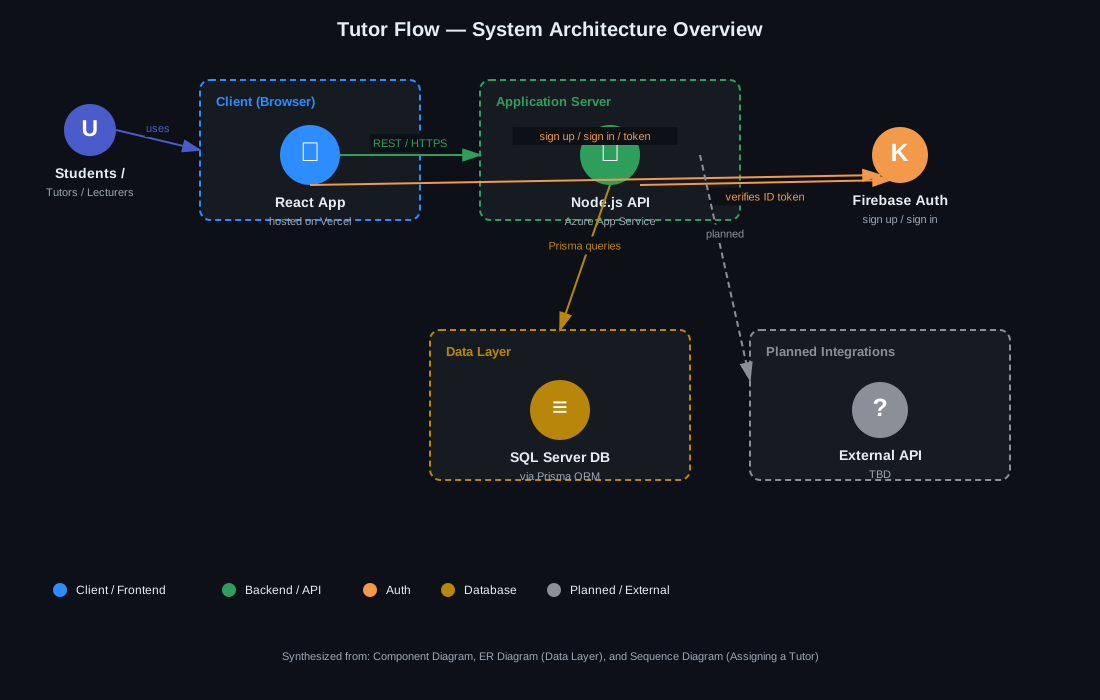
A simplified, high-level view of how Tutor Flow's pieces connect — synthesized from the Component Diagram, the Data Model (ER Diagram), and the Sequence Diagram: Assigning a Tutor to a Course. This page is meant as the "start here" overview before diving into the more detailed diagrams.
How it fits together
- Client (Browser) — the React frontend, hosted on Vercel. This is what students, tutors, and lecturers interact with directly.
- Application Server — the Node.js backend API, hosted on Azure App Service. Talks to the frontend over a hand-written REST/HTTPS API, and is where the combined validation endpoint (
POST /assignments/validate) from the tutor-assignment sequence diagram lives. - Firebase Auth — handles sign up, sign in, and token issuance for the client. The backend verifies the Firebase ID token on incoming requests rather than managing sessions itself.
- Data Layer — a SQL Server database accessed through Prisma ORM. This is where all the entities from the ER diagram (
USER,APPLICATION,TUTOR_ASSIGNMENT,TIMESHEET,SYSTEM_SETTING, etc.) live. - Planned Integrations — an external API slot reserved for future integration; not yet built, shown dashed/grey to flag it as TBD rather than current architecture.
This diagram intentionally leaves out AWS-style infra detail (load balancers, CDNs, auto-scaling groups) since Tutor Flow currently runs on managed platforms (Vercel, Azure App Service) rather than raw AWS infrastructure — those concerns are handled by the platform, not something the team configures directly.
Initial Wireframes
The paper-stage wireframes drawn before implementation began, locking in the layout of each role's primary view — the shared auth shell, the student's application flow, the tutor's hours-and-calendar view, and the lecturer's stacked course/timesheet view.
Auth (Login / Signup / Forgot Password)

Shared AuthLayout shell — one card that swaps between Login, Signup, and Forgot Password. Used by all roles (student, tutor, lecturer) to sign in.
Student — Apply to Become a Tutor

The student picks a course they've already completed and submits a tutor application. Their mark for that course is pulled in automatically (read-only, dashed border) rather than self-reported, since eligibility depends on it. Availability and a short motivation field round out the application. The right-hand panel tracks the status (pending/accepted/rejected) of every application the student has submitted, so they don't need to ask a lecturer directly.
Tutor — Working Hours & Calendar

Top cards summarise hours worked this week against the max allowed, and how many courses the tutor is assigned to — this is where a "hours exceeded" warning would surface. Below that, a weekly calendar grid shows assigned tutoring sessions alongside the tutor's own availability, so clashes are visible at a glance. The timesheet table at the bottom is where the tutor logs hours per date/course/activity before submitting — kept as draft rows until submission, matching the "visible before it's saved" validation requirement from your notes.
Lecturer — Course Tutors, Timesheet Review & Course Registration

Three stacked sections on one page rather than separate tabs, since a lecturer's daily loop is: check who's tutoring their course → review submitted hours → occasionally register a new course. The tutors table shows each tutor's course mark (the same value validated during application) alongside assigned hours and status. The timesheets table is where approve/reject actions happen. The course registration form at the bottom is deliberately minimal (code + name) — you can extend it once you know what else Course needs at creation time.